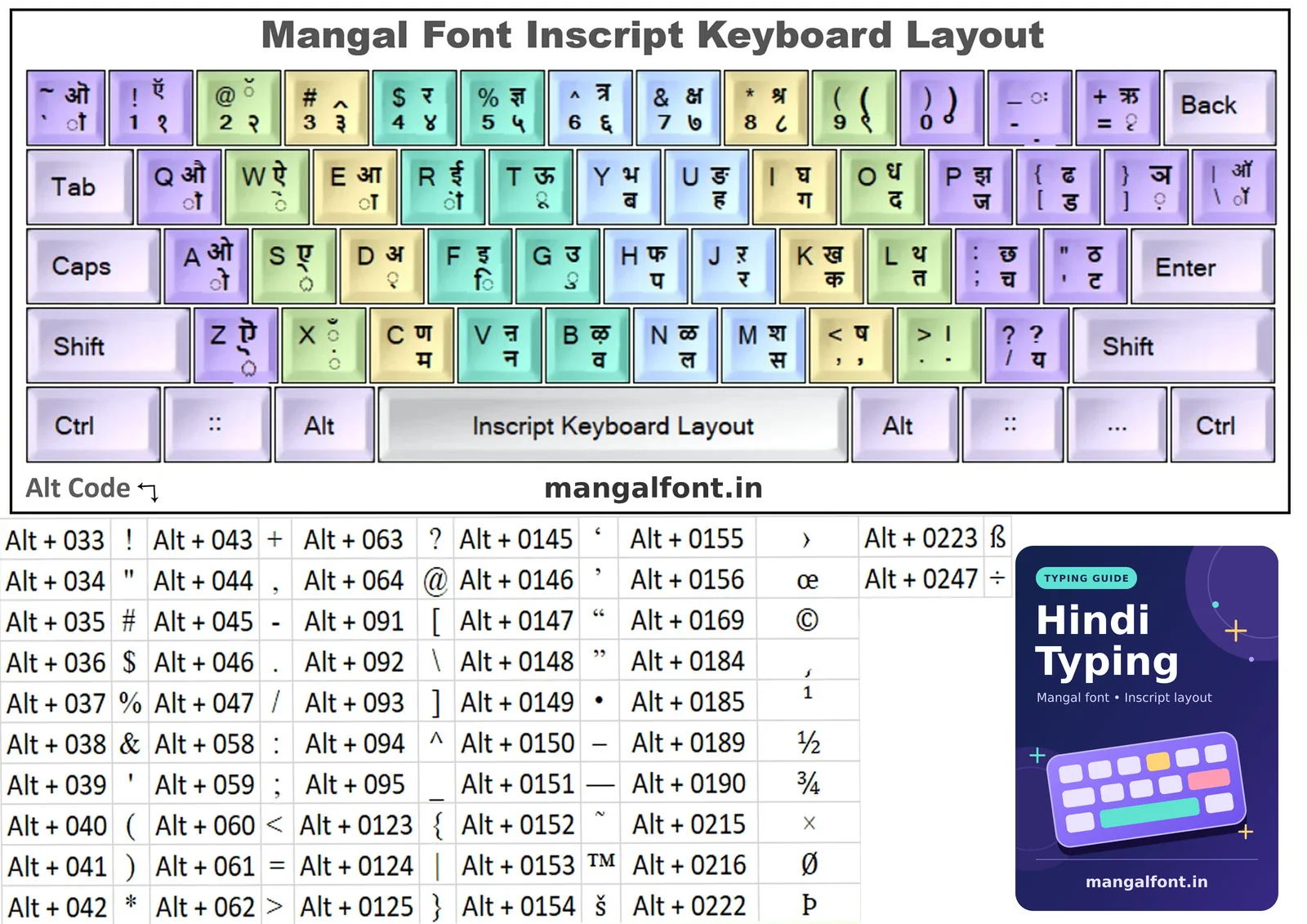
Interactive Inscript keyboard
Orange characters (top right of each key) need Shift. Black characters (bottom right) are typed directly. Small grey letters show the English key.
How the Inscript layout is organised
Inscript (Indian Script) was designed so that the same layout works for every Indian script. The logic is simple once you see it:
- Left hand: vowels and matras. Unshifted keys give the matra (ा ि ी ु ू े ै ो ौ), Shift gives the full vowel (आ इ ई उ ऊ ए ऐ ओ औ). D is the halant (्) and Shift+D is अ.
- Right hand: consonants. Unshifted is the unaspirated letter, Shift gives its aspirated pair: K क / ख, I ग / घ, ; च / छ, P ज / झ, ' ट / ठ, [ ड / ढ, L त / थ, O द / ध, H प / फ, Y ब / भ.
- Bottom row: ं (X), म, न, व, ल, स, and य on /. Shift gives ँ, ण, श, ष and the purna viram । (Shift+.).
Half letters and conjuncts in Mangal font
| To get | Type | To get | Type |
|---|---|---|---|
| क्ष | Shift+7 (or k, d, Shift+,) | त्र | Shift+6 |
| ज्ञ | Shift+5 | श्र | Shift+8 |
| र् (reph, as in कर्म) | j d before the consonant | ्र (as in प्र) | h d j |
| द्य | o d / | क्त | k d l |
| ऋ / ृ | Shift+= / = | ॉ (as in डॉक्टर) | \ |
| ़ (nukta) | ] after the letter | ः (visarga) | Shift+- |
Rule of thumb: consonant + d + consonant makes a half letter, and the matra always comes after the consonant, including ि.
How to turn on the Inscript (Mangal) keyboard in Windows
- Open Settings › Time & language › Language & region.
- Add Hindi, then open its options and add the keyboard Hindi Traditional (this is Inscript).
- Switch between English and Hindi with Win+Space or Left Alt+Shift. Type in Word with the Mangal font selected.
No admin rights to add a keyboard? Use our online Mangal font typing tool: it works with Inscript on any computer. Then build speed with Inscript practice lessons and check yourself with the Mangal font typing test. Coming from a typewriter? Compare with the Remington Gail keyboard.
Alt codes for symbols
The chart above also lists Alt codes for symbols you may need in official letters (hold Alt and type the number on the numeric keypad), for example Alt+0149 for a bullet •, Alt+0169 for © and Alt+0215 for ×.